AI Preset Slots
What it does
When the app saves a build into one of Raid's AI-preset slots (Hydra, Chimera, Doom Tower, etc.), the Slot Picker shows you all existing slots for that content type, marks each as empty / occupied / new, and lets you confirm which one to overwrite — and lets you rename the team while you're there.
The picker exists because Plarium hard-caps you at 15 slots per content type. Writing past that limit crashes Raid. The picker enforces the cap so you never get there.
Two storages, not one — what's quota-bound and what isn't
Before the picker matters, know that the app keeps two completely separate stashes of builds:
- Helper-side library (unlimited) — every build you save in the app stays local to your Mac. No cap. Save hundreds of variations of the same Hydra team if you want. This is your personal scratchpad.
- Raid-side AI preset slots (15 per content type) — when you actually want Raid to USE a build (auto-battle with your preset), you push it from the helper library into one of Raid's 15 slots. THIS is where the picker comes in.
So your workflow is two-stage: save freely on helper side → choose which 15 to mirror into Raid. The picker only governs the second stage; the first is friction-free.
Per-hero saves vs team presets
The helper-side library holds two kinds of saves:
- Team preset — 4 or 5 heroes + gear loadout for a specific content (Hydra, Chimera, Doom Tower). What the picker pushes into Raid's AI slots.
- Per-hero build — a single hero + a specific 6-artifact loadout, saved with a name. Useful for archiving "this is Demytha's CB UNM build" or "this is Hansel's Hydra clash build". You can apply a per-hero build instantly without going near AI-preset slots.
Both are unlimited. Per-hero builds live as SavedHeroBuild records (hero instance id + name + 6 artifact ids); team presets aggregate several per-hero builds plus turn-order metadata.
Where to find it
The picker auto-appears whenever you save a build that targets an AI-preset slot — e.g. Builds → Apply build, or any "Send to Raid as preset…" flow. You don't open it directly; it pops up at save-time so you can confirm.
Slot status icons
Phantom slots are only offered when you're below the 15-slot quota. At quota = 15/15, no phantoms appear — you must overwrite an existing one.
The dialog layout
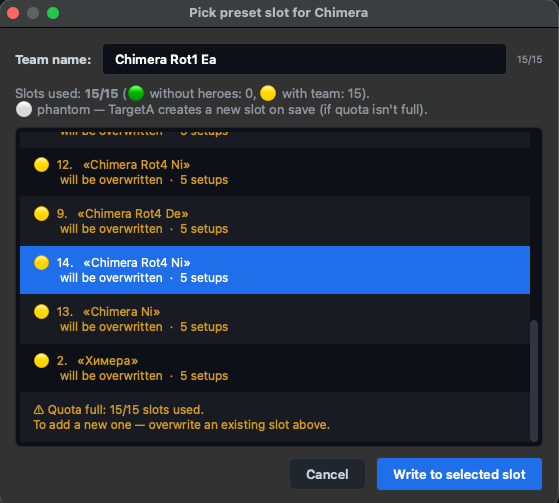
- Team name field — 15-character max (Plarium-enforced). The char counter turns orange near the limit. If you leave it empty, the game assigns a default name on its side.
- Quota line — "Slots used: N/15 (🟢 M without heroes, 🟡 K with team). ⚪ phantom — Plarium creates a new slot on save (if quota isn't full)."
- Slot list — one row per slot: icon + slot number (1..15) + name (or "Unnamed") + tail hint ("empty — safe to write" / "will be overwritten" / "fully empty — recommended") + saved-setup count.
- Footer — Cancel / Write to selected slot.
The dialog auto-preselects the safest option: first phantom (if available), else first empty, else first occupied. You can override that choice freely.
Overwriting an occupied slot
If you pick a 🟡 occupied slot, a confirm popup asks:
"Slot 4 «My Hydra Spread» is occupied. Overwrite?"
This is the only destructive moment in the flow. After you click Yes, the old team in that slot is gone and your build takes its place.
When quota is full
At 15/15, the bottom of the slot list shows a non-selectable hint row:
"⚠ Quota full: 15/15 slots used. To add a new one — overwrite an existing slot above."
Phantom rows disappear entirely so there's no accidental "make a 16th" path. Pick one of the existing 15 to overwrite, or Cancel and clear a slot in-game first.
Slot numbering — what you see vs what Plarium uses
Workflow — step by step
- Build or pick a team in the app's optimizer / inventory tab.
- Trigger save-as-preset (button label varies per tab — usually "Send to Raid" or "Apply build").
- Slot Picker pops up automatically. Read the quota line.
- (Optional) Edit the team name field — 15 chars max.
- Pick a 🟢 empty or ⚪ phantom slot for non-destructive write, OR pick a 🟡 occupied slot you want to replace.
- Click Write to selected slot. Confirm the overwrite popup if you chose an occupied slot.
- Build is saved. Open Raid → Hydra/Chimera/etc → AI Presets to see it.
Common questions
"No slots in this range" — what now?
You've never used AI presets for this content type in Raid. The game won't have allocated any slot range yet. Open Raid → Alliance → Hydra → AI settings (or the equivalent menu for whichever content type you're targeting) once, save any junk preset, then re-trigger the picker. Plarium will have created slot 1 and the picker will show it.
Why a simple 1-15 prompt instead of the full picker?
The slot list is read live from Raid's memory. If that read fails (e.g. Live Sync just attached and the in-game menu isn't open), the app falls back to a basic 1-15 number prompt — same write path but without the empty/occupied preview. Refresh and re-trigger to get the full picker.
Can I leave the team name blank?
Yes — Raid assigns a default. The name counter just turns orange to warn you that you're saving with no name; the save still proceeds.
What's "phantom" really mean?
A slot that doesn't physically exist yet in Raid's preset list. When you save into a phantom, Plarium allocates the next available slot ID and inserts your team there. Only available while you're under the 15-slot quota.
Tier gating
Available in Free, Premium, and Founders tiers. No restrictions on slot management itself; the underlying build features that trigger the picker may have their own tier limits (see Pricing).