Food Picker
What it does
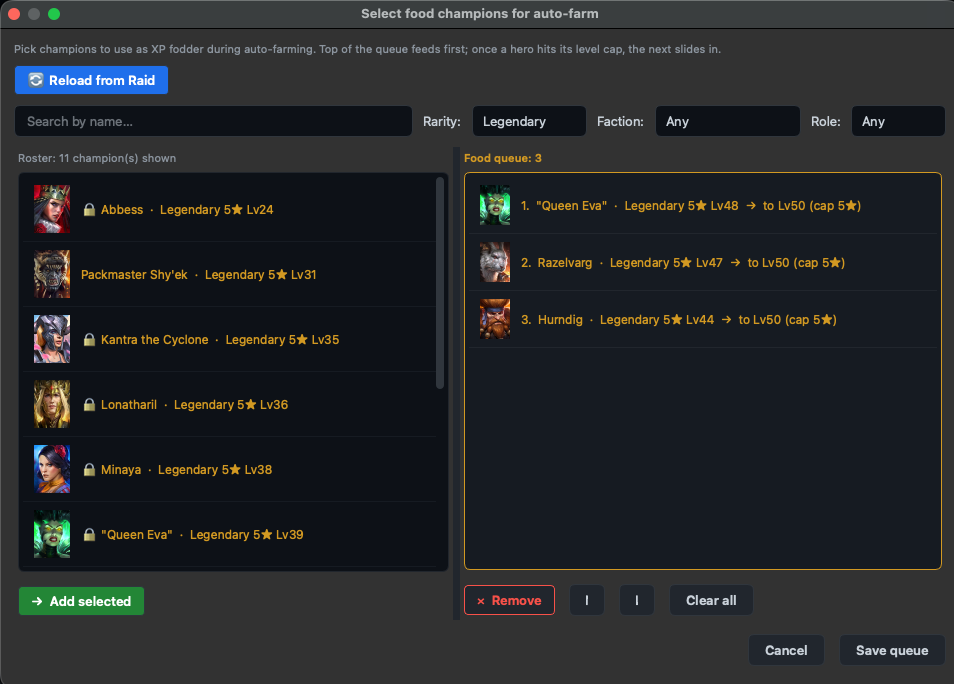
The Food Picker lets you build a queue of champion-food once, then let auto-farm rotate the heroes between battles for you. Every Raid player knows the chore: open Re-pick, drag five low-rarity heroes, fight, repeat. The picker turns that into "set it once, forget it".
When a queued champion hits its rank cap (e.g. 3★ Lv30), the rotator slides the next champion in — no clicks, no missed XP from over-leveling.
Where to find it
Sidebar → Auto-Farm tab → press the Queue button in the farm controls. Tooltip on hover: "Open food queue dialog: pick champions to use as XP fodder during auto-farming."
The roster pane (left)
Lists every champion in your account snapshot that can still gain battle XP — i.e. heroes whose current level is below their rank cap. Heroes already at max level for their star rank are hidden.
Filter bar at the top:
- Search — by hero name
- Rarity — Common / Uncommon / Rare / Epic / Legendary
- Faction — all 16 in-game factions
- Role — Attack / Defense / HP / Support
Multi-select with checkboxes (or hold ⌘ to multi-click). The Add selected button below the list sends every checked hero into the queue. Double-clicking a single hero adds it instantly.
The queue pane (right)
Ordered list, numbered 1..N. The auto-farm rotator works through this top-to-bottom. For each entry you see:
- Portrait + name + rarity badge
- Current level → target cap (e.g.
2★ Lv1 → 2★ Lv20) - The cap auto-clamps to the in-game maximum for the hero's current rank, so you can't accidentally over-shoot.
Controls below the queue:
- ↑ / ↓ — reorder the selected entry
- Remove — drop the selected entry from the queue
- Clear all — wipe the queue
Saving the queue
Click Save queue in the dialog footer. The queue persists to disk under ~/Library/Application Support/RSL Tool/food-queue.json and is read on every auto-farm replay until you change it again.
Locked heroes ARE valid food
Earlier builds (before 2026-05-19) silently dropped locked heroes from the roster. That was wrong — battle-XP and account-locking are unrelated systems. The current picker shows locked heroes with a small 🔒 badge but treats them as fully usable food.
Reload from Raid (Live Sync)
If Live Sync is attached to a running Raid window, the 🔄 Reload from Raid button at the top pulls your current roster live from the game's memory — useful right after pulling shards or completing a fusion when your account snapshot is stale.
Without Live Sync, the picker uses the latest account import snapshot. If neither exists, the roster pane is empty until you import.
Workflow — step by step
- Finish an account import (or attach Live Sync) so the picker has a roster to show.
- Open Auto-Farm tab → click Queue.
- Filter the roster — rarity = Common/Uncommon is the usual food filter.
- Check the boxes, hit Add selected.
- Use ↑/↓ to put your priority feeders first.
- Click Save queue.
- Back in Auto-Farm, start a campaign run. The rotator reads the queue and swaps food between battles automatically.
Common questions
Why is the roster empty?
You haven't completed an account import yet, or your latest import returned 0 heroes (game wasn't running, or process was unreachable). Go to Account import and run a fresh read.
Why don't I see hero X in the list?
X is already at max level for its current star rank — it can't gain more battle XP without ranking up first, so it's not a useful food candidate. Rank it up in Raid, re-import, and it'll reappear.
Why was the "Apply now" button removed?
Old builds had an inline "Apply now" that wrote a team directly without going through the auto-farm rotator. That bypassed leader-protection logic and could swap out your campaign farmer. The button is gone — auto-rotation between battles is now the only path, and it always preserves the team leader.
Does the queue auto-save?
No — you have to press Save queue. The dialog doesn't autosave on close, by design (so an accidental Cancel doesn't trash your queue).
Tier gating
Food Picker is available in Free, Premium, and Founders tiers. No paid-tier restrictions. The auto-farm engine that consumes the queue does have its own session-length limits on Free — see Pricing.