Team Optimizer
What it does
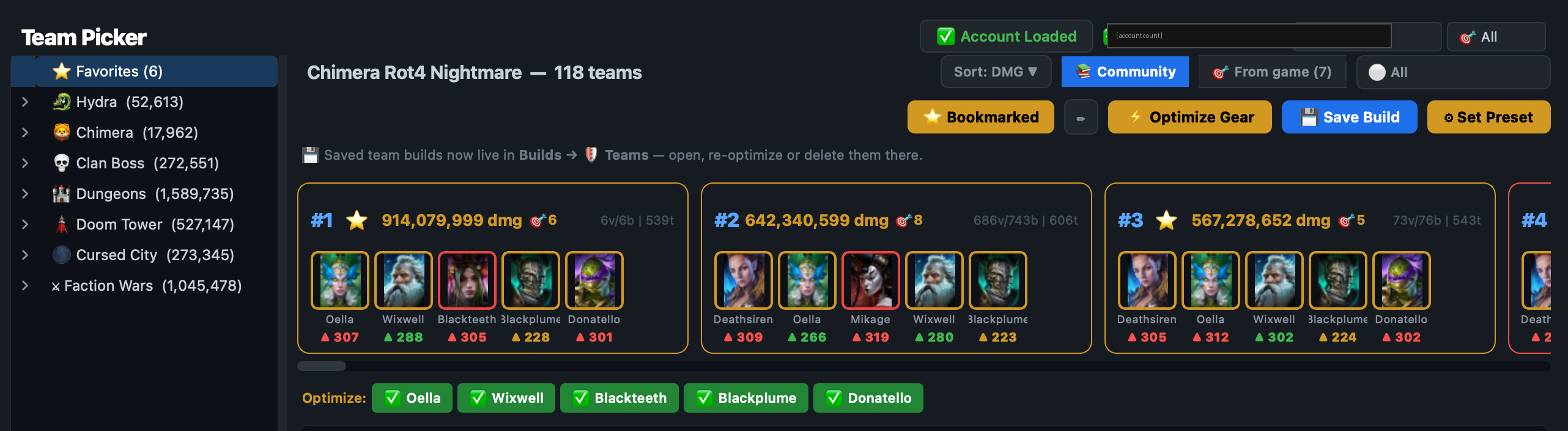
The Team Optimizer (also called Team Picker) lets you browse crowd-sourced top-player teams for every dungeon, boss difficulty, and event content. For each team it tells you:
- Whether you own all the required heroes
- Whether your roster’s SPD tunes match the required turn order
- Per-hero gear / stat readouts (Premium) or per-hero speed only (Free / Trial)
Picking content
The dropdown at the top of the page selects the content — Clan Boss UNM, Hydra Brutal, Chimera UNM, Faction Wars stage 21, Doom Tower 120, etc. Each stage has its own community pack with its own team rankings.
The four filter modes
Below the content dropdown sits a single dropdown labelled “Filter”:
- All — every team in the pack, sorted by clear quality
- 🟢 Ready — only teams where you own every hero AND your SPD tunes match the recommended order
- 🟡 Needs push — teams where you own everyone but a hero or two is too slow / too fast and one re-roll could fix it
- 🔢 By turn order — teams whose SPD order is satisfied by your roster (heroes don’t need to match — only the order does)
- ⭐ Favourites — teams you’ve starred
Per-hero detail panel
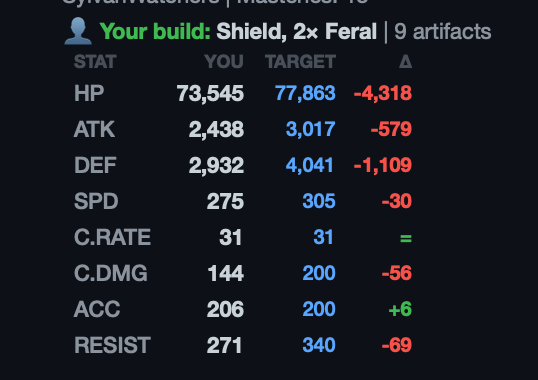
Click any team card and the right-hand panel shows the per-hero breakdown. For each hero:
- Your icon + name + role badge
- If you own them: the required SPD vs your current SPD (delta in green / red)
- Premium: full final-stats table — HP, ATK, DEF, SPD, CR, CD, ACC, RES — with delta vs the target build
- Free / Trial: SPD only, plus an upsell hint pointing to Premium
Variations
Most top teams have several published variations — different gear tunes with different recommended turn orders. The variation strip under the team card lets you cycle through them. The “Fitting only” toggle hides variations that don’t match your SPD order (so you don’t have to scroll past them).
Weekly limit
Optimizer builds (open a team’s full detail panel) count against your weekly quota:
- Free: 20/week, speed-only stats
- Premium / Trial: 20/week, full stats
- Founders: unlimited
The counter resets weekly on a rolling 7-day window anchored to your license issue date. The status bar shows remaining quota.
Common questions
“No heroes match” on every team
Your account import probably hasn’t completed or used an outdated dump. Refresh from Settings → Account.
The SPD shown for my hero looks wrong (too low / high)
The Picker shows post-mastery, post-aura final SPD with Live-Sync data when available. If you’ve very recently changed masteries in-game and Live-Sync is off, hit ↻ Refresh to re-read the roster.
Where does the team data come from?
Community packs — anonymous opt-in telemetry from other RSL Tool users (per their consent at first launch). No individual player is identifiable; teams are pooled and aggregated. See Privacy policy, Section 3.