Soul Collection
What it does
The Soul Collection tab gives you a tournament-grade table of every Double-Ascend soul you own, broken down per hero and per grade (G1 through G6). At a glance you see who you can already awaken, who's halfway there, and which souls you have duplicates of.
The page reads owned souls from your account snapshot (doubleAscendSoulCount) and cross-references the in-game static dictionary to identify which soul belongs to which hero, at which grade and rarity.
Where to find it
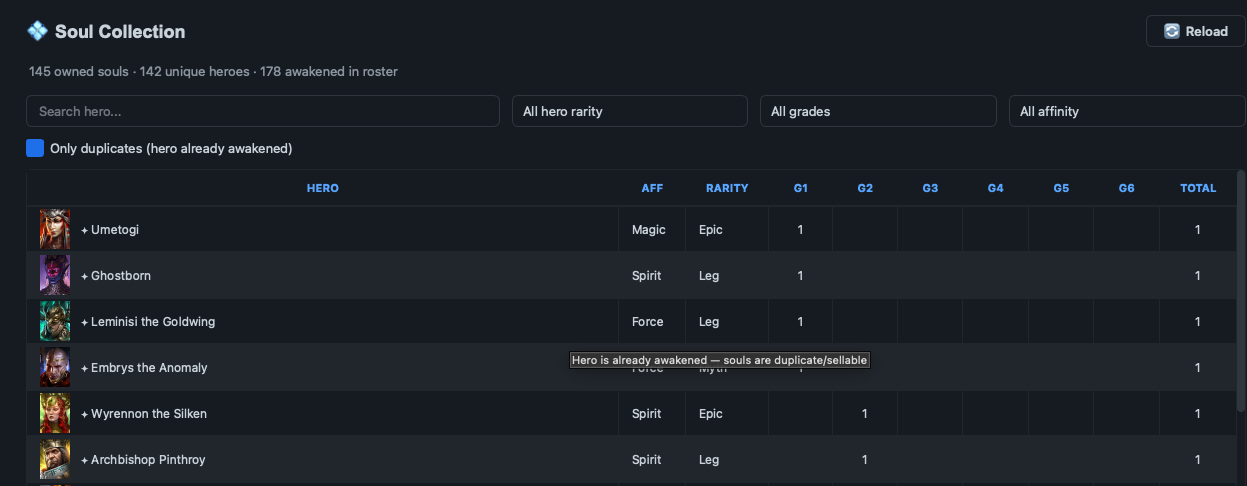
Sidebar → Souls (💠 icon). The page header reads "💠 Soul Collection" with three counters: total souls owned, unique heroes covered, and how many heroes in your roster are already awakened — e.g. "145 owned souls · 142 unique heroes · 178 awakened in roster".
What you see
Header strip:
- 💠 Soul Collection title + ownership counters
- 🔄 Reload button — re-reads
latest.jsonfrom disk (use after a fresh account import)
Filter row below:
- Search hero... — text filter by champion name
- Hero rarity — All / Rare / Epic / Legendary / Mythical
- Grade — All / G1 / G2 / G3 / G4 / G5 / G6
- Affinity — All / Magic / Spirit / Force / Void
- ☑ Only duplicates (hero already awakened) — hide heroes who haven't been awakened yet; show only the ones where any remaining soul is a duplicate (and therefore sellable / shardable)
Table columns: Hero | Affinity | Rarity | G1 | G2 | G3 | G4 | G5 | G6 | Total. Each cell is a count; empty cells mean 0 owned of that grade for that hero. Hover a row whose hero is already awakened — tooltip reads "Hero is already awakened — souls are duplicate/sellable".
Awakened heroes
If you've already Double-Ascended a hero, their row is annotated (the importer reads the awakening state from the same snapshot). They still appear in the table but the visual cue makes it easy to skip "already done" heroes when planning your next awakening run.
Row tooltips — awakened state
Hover any row whose hero is already Double-Ascended — a tooltip reads "Hero is already awakened — souls are duplicate/sellable". That's the visual cue you can sacrifice/shard remaining souls of that hero without risk of locking out a future awakening.
Soul typeId — how the app links a soul to its hero
typeId format: {grade}{rarity}00{base_hero_id}. So a Legendary G3 Demytha soul is 3 5 00 + Demytha's base ID. The table picks each owned soul ID from the account snapshot, decodes the prefix to grade+rarity, looks up base_hero_id in a static hero dict, and renders the row.This means a single hero with multiple awakening paths (or rarity variants) gets ONE row — totals are pure ownership, not weighted by any "value" formula.
Workflow — typical uses
"Who's next to awaken?"
- Open Souls tab.
- Filter Grade = G5.
- Sort by Total descending — heroes near the top are closest to a G5 awakening, since you have multiple G5 souls already.
"Who's wasting souls?" (planning sacrifices)
- Open Souls tab.
- Check ☑ Duplicates only.
- Each remaining row is a hero where you have unspent duplicates. Sacrifice/shard them safely in-game — start with the high-grade ones for the best return.
Common questions
The table is empty after a fresh import
Two likely causes: (1) account snapshot didn't include doubleAscendSoulCount — happens on stale dumps; re-run Account import. (2) Static soul dictionary (soul_types.json) missing from the install — reinstall the app. The header counter will read "0 souls" in both cases; check logs (Help → Open log dir) for "Loaded N static soul type entries".
Why is hero X missing from the table?
The table only lists heroes you own at least one soul of. Heroes with zero souls don't render — wins clutter, costs visibility. To see ALL heroes, use the Team Optimizer's roster view instead.
Counts don't match what I see in Raid
The page is a snapshot reader, not Live Sync. It shows whatever was in your last account import. Hit 🔄 Reload if you just re-imported; if you imported BEFORE pulling new souls, re-import via the Account tab first.
Tier gating
Available in Free, Premium, and Founders tiers. No paid-tier restrictions on the Soul tab itself — it's a snapshot-reader. Account import has its own per-tier quota (see Pricing).